Back to upstreaming!
For the last few years, I haven’t had the chance to do much upstreaming as part of my day job. It took some time to “get back on the horse,” and I wanted to share my thoughts on how the process has evolved since I last contributed.
What to Upstream?
The first step was deciding which hardware to target. My current work revolves around the Qualcomm Android BSP, which unfortunately doesn’t offer much room for upstreaming.
I decided to revisit my hardware stock and picked the Tungsten510 and Tungsten700 SMARC modules which are based on the MediaTek Genio processors.
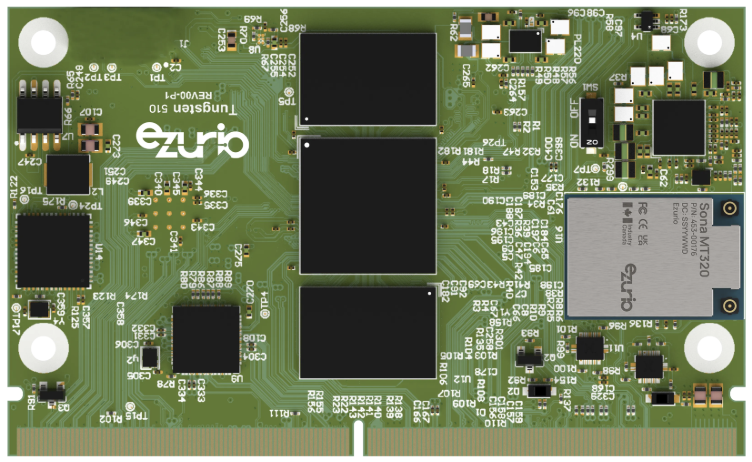
The idea was to get a powerful platform that would allow testing many aspects of the kernel. That is what the Genio SoCs offer as they are high-end SoC (up to 8 cores, Mali GPU, USB3.0, GbE, PCIe, MIPI-DSI, HDMI etc…) and are well supported upstream thanks to the work from Collabora.
The Upstreaming process
Once the hardware was selected, the goal was to get the boards running on mainline Linux. This was relatively straightforward because I had previously performed a platform port for the Android (RITA) release from Baylibre, which was based on Android kernel 6.12 and Collabora upstream patches.
First Submission
Now that the board is booting on mediatek-next branch, it was rebased on top of master which was v6.18-rc1 at the time.
As my previous device tree contribution was in 2018, I was rusty and not necessarily aware of process changes. Therefore I went ahead with my (old) way:
$ git format-patch --cover-letter -o patches_v1
$ ./scripts/get_maintainer.pl patches_v1/000*
$ vim patches_v1/000*
Spoiler: Don’t do this! These manual steps are largely outdated.
First feedback I received after sending the series was: “Just use b4!”.
The b4 Tool
What is b4? It’s a tool created to make both developers and maintainers lives easier. And now that I’ve used it I confirm that it is true to its promise. Moreover the documentation is awesome:
Note that the b4 binary that comes with your OS might be outdated, so I recommend using pip to get the latest:
$ pip install b4
But what does it do really? It automates almost every tedious part of the contribution cycle:
- Change Tracking: Keeps your series organized.
- Validation: Runs checkpatch automatically via
b4 prep --check. - Auto-CC: Identifies and CCs the correct maintainers via
b4 prep --auto-to-cc. - Cover Letters: Simplifies writing and editing via
b4 prep --edit-cover. - Tag Management: Automatically retrieves review tags from the mailing list via
b4 trailers -u.
Once all of the above options have been used to ensure the series looks good, you can simply send (or even do a dry-run):
$ b4 send
At this stage, the whole patch management process was ok, now to the next tool.
DTS schema validation
Another major shift since 2018 is the rigor of Devicetree Schema validation. I was aware of the Linaro guide on the subject.
I initially forced the use of my distro’s dt-schema package (v2022.08), but the kernel now requires versions > 2023.9. Bypassing this check hides critical errors.
Fortunately, the bot reporting the issues does give a clue:
If you already ran DT checks and didn't see these error(s), then
make sure dt-schema is up to date:
  pip3 install dtschema --upgrade
After the upgrade I was able to replicate the issues reported by the bot and fix them. To be noted that the errors are very useful, it checks the bindings, the node names and so on, this tool will now be in my todo list for each device tree made.
Here is what it looks like on the latest version of my patch:
$ make CHECK_DTBS=y mediatek/mt8370-tungsten-smarc.dtb
  DTC [C] arch/arm64/boot/dts/mediatek/mt8370-tungsten-smarc.dtb
/linux/arch/arm64/boot/dts/mediatek/mt8370-tungsten-smarc.dtb: pmic (mediatek,mt6359): '#sound-dai-cells' does not match any of the regexes: '^pinctrl-[0-9]+$'
	from schema $id: http://devicetree.org/schemas/mfd/mediatek,mt6397.yaml#
/linux/arch/arm64/boot/dts/mediatek/mt8370-tungsten-smarc.dtb: scp@10720000 (mediatek,mt8188-scp-dual): reg-names: ['cfg'] is too short
	from schema $id: http://devicetree.org/schemas/remoteproc/mtk,scp.yaml#
/linux/arch/arm64/boot/dts/mediatek/mt8370-tungsten-smarc.dtb: scp@10720000 (mediatek,mt8188-scp-dual): reg: [[0, 275906560, 0, 917504]] is too short
	from schema $id: http://devicetree.org/schemas/remoteproc/mtk,scp.yaml#
/linux/arch/arm64/boot/dts/mediatek/mt8370-tungsten-smarc.dtb: scp@10720000 (mediatek,mt8188-scp-dual): reg-names: ['cfg'] is too short
	from schema $id: http://devicetree.org/schemas/remoteproc/mtk,scp.yaml#
But wait, there are still errors!?! True, but those are from mt8188.dtsi and also present in other platforms, to be fixed separately.
Current Status & Results
After learning to use these tools and incorporating feedback, I’ve submitted v5 of the series:
While not yet merged, the series is in good shape. Most major features are already working:
- MIPI-DSI Display & GPU (Panfrost)
- SDIO: eMMC, SD & Wi-Fi/BT (MT7921S)
- Gigabit Ethernet, USB 3.0 & PCIe

Next blog post will be showing more in-depth testing and benchmarking.
Also, I will provide updates as missing features become supported:
- HDMI
- I2S Audio
- Video codecs (h.264/h.265)
- Camera support
Let me know if you have any questions!